Compatibility and Features
Scooter compatibility
In this list you can find lists Hardware which is compatible with the VESC2X3Bridge. I recommend you choose your next build regarding this list for maximum compatibility.
Step 1 Choose your Target
Choose your Target model which you want to buy or already own, below
In the list below, you can find all currently supported and unsupported models.
| Brand | Series | Type | Compatible? | Notes |
|---|---|---|---|---|
| Segway Ninebot | X3 | G3 | ✓ | Development platform |
| Segway Ninebot | X3 | ZT3 | ✓ | Based on G3 |
| Segway Ninebot | X3 | GT3 | ✓ | Based on G3 |
| Segway Ninebot | X3 | GT3 Pro | x | Not compatible |
| Segway Ninebot | X3 | F3 | ? | Untested |
| Segway Ninebot | X3 | E3 | ? | |
| Segway Ninebot | / | G2 | x | Not compatible |
| Segway Ninebot | / | G30 | x | Not compatible |
Feel free to ask in my Telegram channel about planned compatibility.
Note: I'm currently only focusing on Segway Ninebot scooters.
Step 2 Choose a compatible VESC
I prefer Spintends Ubox Series as they are almost plug and play
VESC compatibility
In the list below, you can find all tested VESC hardware versions.
Note: Generally all VESCs should be compatible, but here is a list of tested VESCs.
| Brand | Series | Model | Compatible? | Notes |
|---|---|---|---|---|
| Spintend | Ubox | 100V 100A (100100) | ✓ | |
| Spintend | Ubox | 85V 150A (85150) | ✓ | Ignition port is 5-pin instead of 7-pin *1 |
| Spintend | Ubox | 85V 240A (85240) | ✓ | |
| Spintend | Ubox | 85V 250A V1&V2 (85250) | ✓ | |
| Spintend | Ubox | 126V 160A (126160) | ✓ | |
| Tronic | X12 | 120V Pro | ✓ | Not plug and play *2 |
| Tronic | X12 | 150V Pro | ✓ | Not plug and play *2 |
| ENNOID | MK8 | 150V | ✓ | Not plug and play *3 |
| ENNOID | MK8 | 150V Pro | ✓ | Not plug and play *3 |
| ENNOID | MK9 | 200V Pro | ✓ | Not plug and play *3 |
*1 The 85150 uses a 5-pin connector for the ignition port. You need to create your own cable to use the ignition function of your VESC with the VESC2X3Bridge. See below.
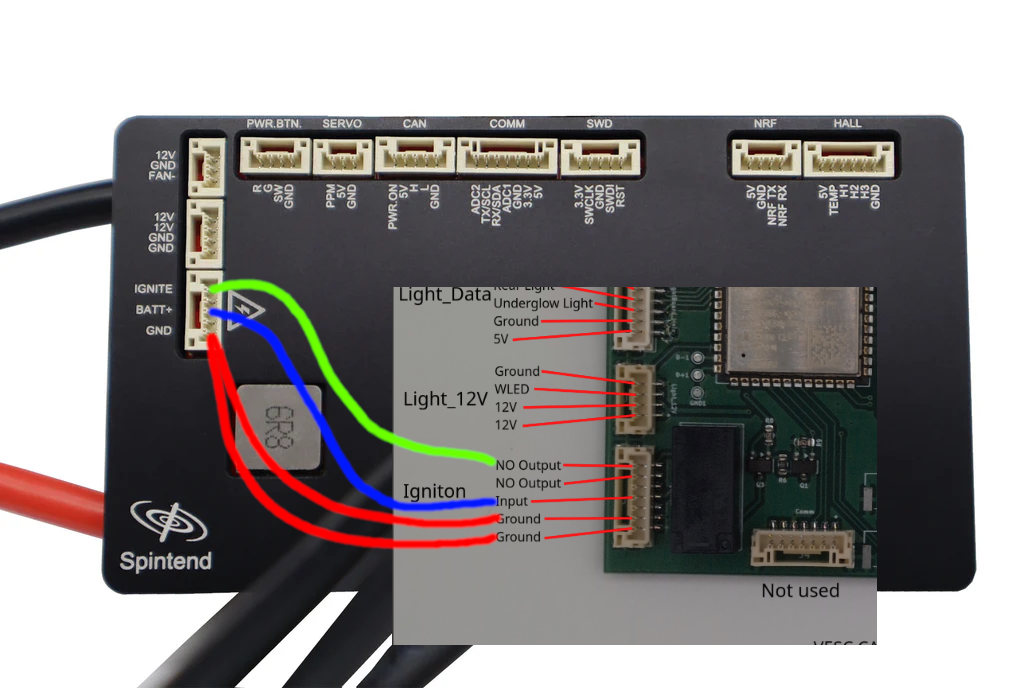
*2 The Tronic X12 series has different ports. You need to create your own cables.
*3 ENNOID uses different port pinouts. The switch on the MK8 series is normally closed, so you need to solder wires to the NC port of the relay.
Segway App compatibility
This section is in progress. App compatibility details will be added soon.
| Features | Compatible? |
|---|---|
| Navigation | ✓ |
| Phone calls | ✓ |
| In App Dashboard | ✓ |
VESC2X3Bridge versions
There are multiple versions of the VESC2X3Bridge.
Starting with version V2.1, the bridge uses a new chip with different pinouts. To use the old or new chip, go to Webconfig and toggle the checkbox accordingly. In the list below, you can find all bridge versions.
| ESP32-S3 Variant | Board version label |
|---|---|
| ESP32-S3-Zero (FH4R2) | V1.0 - V2.0 |
| ESP32-S3-WROOM-1 | V2.0 and up |
Feature overview
- Display speed output
- Profile switching
- Motor temperature display
- Wattage and current display
- Indicator and rear light support
- Original battery support for supported models
VESC2X3Bridge functions
| Function | Working? | Notes |
|---|---|---|
| Throttle and brake | x | Managed by the VESC |
| Speed on Display | ✓ | |
| Profile switching | ✓ | Needs improvement |
| Motor Temperature on Display | ✓ | |
| Wattage on Display | ✓ | Fixed |
| Amps on Display | ✓ | Fixed |
| Indicators | ✓ | |
| Rear light | ✓ | With brake light support |
| Original Ninebot G3 / GT3 / ZT3 battery | ✓ | Needs configuration in Webconfig |
| Cruise Control | ✓ | Only available with the US serial number |
| Firmware Update via Webconfig | ✓ |
Planned additions
- Per-feature configuration examples
- Firmware-version compatibility notes
- Known limitations and workarounds